Adding new rules
The easiest way to extend ZPA with custom coding rules is to grab the template project from there and import in your favorite IDE: https://github.com/felipebz/zpa/releases/download/4.2.0/plsql-custom-rules.zip
The example project can be compiled using Maven or Gradle.
Customizing the pom.xml (if you're using Maven)
You probably want to customize some properties in the pom.xml file.
Properties such as groupId, artifactId, version, name and description can be freely modified.
The sonar-plugin-api dependency represents the minimum version of SonarQube your plugin will support. You also need a
dependency on the sonar-zpa-plugin and, optionally, a dependency on zpa-checks-testkit for easier testing.
It is important to note that the sonar-packaging-maven-plugin is required and it contains the entry point of the
plugin, as provided in the property pluginClass. If you refactor the code or rename the class extending
org.sonar.api.SonarPlugin, you will have to change this configuration.
Customizing the build.gradle.kts (if you're using Gradle)
You probably want to customize some properties in the build.gradle.kts file.
Properties such as group, version and description can be freely modified.
The sonar-plugin-api dependency represents the minimum version of SonarQube your plugin will support. You also need a
compileOnly dependency on the sonar-zpa-plugin and, optionally, a testImplementation dependency on
zpa-checks-testkit for easier testing.
It is important to note that you'll may need to update the values
in attributes map of the jar
task.
Creating the repository
SonarQube groups the rules in repositories, so we need to declare a repository first. You can just change the repository key and name in the PlSqlCustomRulesDefinition class.
Writing a check
To create a check, you can create a subclass of org.sonar.plugins.plsqlopen.api.checks.PlSqlCheck. You can use the
org.sonar.check.Rule and org.sonar.plugins.plsqlopen.api.annotations.ConstantRemediation annotations to configure
the check metadata (name, description, key...).
Very often you'll need to override just two methods:
init(): subscribe to the desired grammar rulesvisitNode(AstNode): analyze the nodes that match the subscribed grammar rules
Suppose you want to write a rule that check for DMLs targeting the USER table. First of all, we need to check the AST to plan how to write the check. The AST can be verified using the ZPA Toolkit:
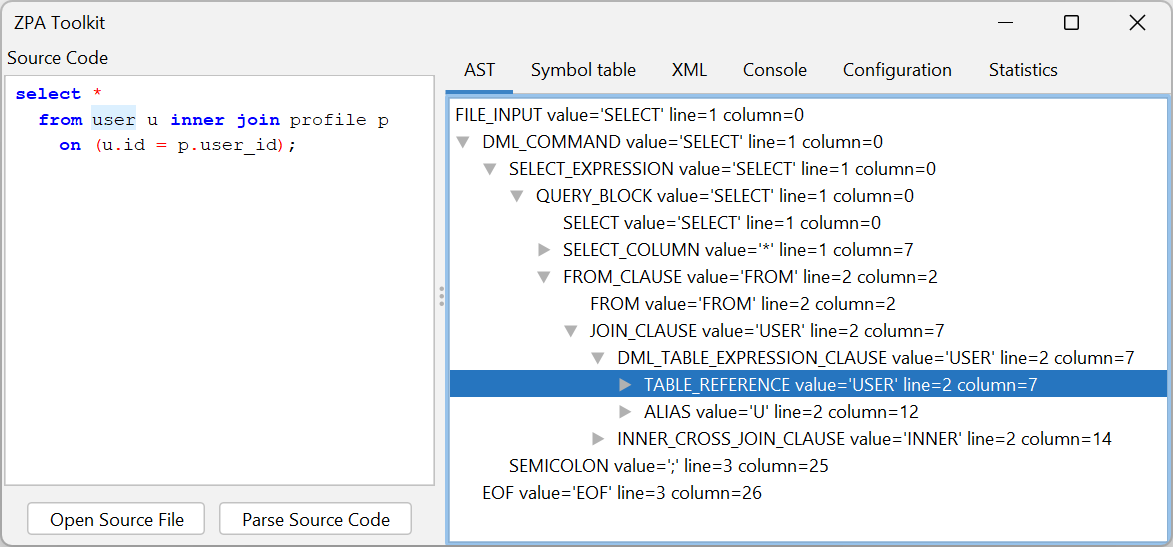
Let's start subscribing the DML_TABLE_EXPRESSION_CLAUSE rule:
public void init() {
    subscribeTo(DmlGrammar.DML_TABLE_EXPRESSION_CLAUSE);
}
Every instance of the DML_TABLE_EXPRESSION_CLAUSE rule will trigger the visitNode method. Then we can check if it is a TABLE_REFERENCE to the table named USERS and create a violation indicating the table usage:
public void visitNode(AstNode node) {
    AstNode table = node.getFirstChildOrNull(DmlGrammar.TABLE_REFERENCE);

    if (table != null && table.getTokenOriginalValue().equalsIgnoreCase("user")) {
        addIssue(table, "Replace this query by a function of the USER_WRAPPER package.");
    }
}
After create the rule, you need to add it to the check list.
Testing the check
To test your check you only need two files.
- A class to execute the tests:
public class ForbiddenDmlCheckTest {

    @Test
    public void test() {
        PlSqlCheckVerifier.verify("src/test/resources/forbidden-dml.sql", new ForbiddenDmlCheck());
    }

}
- And the corresponding sql file:
select *
  from user u; -- Noncompliant {{Replace this query by a function of the USER_WRAPPER package.}}
--     ^^^^
The -- Noncompliant comment is required to indicate that you are expecting an issue in this line. The double braces
contains the message that you expect to see in the SonarQube UI.
Optionally, you can indicate the precise location of the issue using carets (like this example, with carets pointing to the "user" word).
Project-aware custom rules (experimental)
Project-aware analysis is available as an experimental API for rules that need to inspect facts
from more than one source file. The capability is always available from a check through the
protected projectAnalysis() method; when the project was not prepared, query results report
NOT_PREPARED instead of returning a null value.
The project-analysis classes are marked with ZpaExperimentalApi. Kotlin rules must opt in with
@OptIn(ZpaExperimentalApi::class); Java rules can use the API normally.
For example, a Java rule can compare a package specification and body without importing ZPA's project implementation classes:
import org.sonar.plugins.plsqlopen.api.project.PackageParameter;
import org.sonar.plugins.plsqlopen.api.project.PackageSpecificationResolution;

PackageSpecificationResolution resolution = projectAnalysis().resolvePackageSpecification(node);
if (resolution.getStatus() == PackageSpecificationResolution.Status.RESOLVED) {
    var body = resolution.getBody().orElseThrow();
    var specification = resolution.getSpecification().orElseThrow();

    var specificationByOrdinal = new java.util.HashMap<Integer, PackageParameter>();
    for (PackageParameter parameter : specification.getParameters()) {
        specificationByOrdinal.put(parameter.getOrdinal(), parameter);
    }
    for (PackageParameter bodyParameter : body.getParameters()) {
        PackageParameter specificationParameter = specificationByOrdinal.get(bodyParameter.getOrdinal());
        if (specificationParameter == null) {
            return;
        }
        if (specificationParameter.isNocopy() && !bodyParameter.isNocopy()) {
            addIssue(node, "Add NOCOPY to this parameter to match its package specification.");
        }
    }
}
The supported project query currently returns RESOLVED, NOT_FOUND, AMBIGUOUS, INCOMPLETE,
NOT_PREPARED, or NOT_APPLICABLE. Rules should act only on RESOLVED; the other states are
intentionally conservative. RESOLVED means that a unique specification fact was extracted
and correlated from project sources. It does not guarantee that the specification source later
produced a recovery-free parser AST.
For multi-file rule tests, use the additive ProjectPlSqlCheckVerifier with one
ProjectTestSource per file. All sources are prepared before scanning, while findings are
checked immediately after each file is scanned. The existing PlSqlCheckVerifier remains a
legacy single-file verifier.
Deploy the plugin
Just build the plugin and copy the .jar file created in the target directory to the SonarQube server (SONARQUBE_HOME/extensions/plugins).